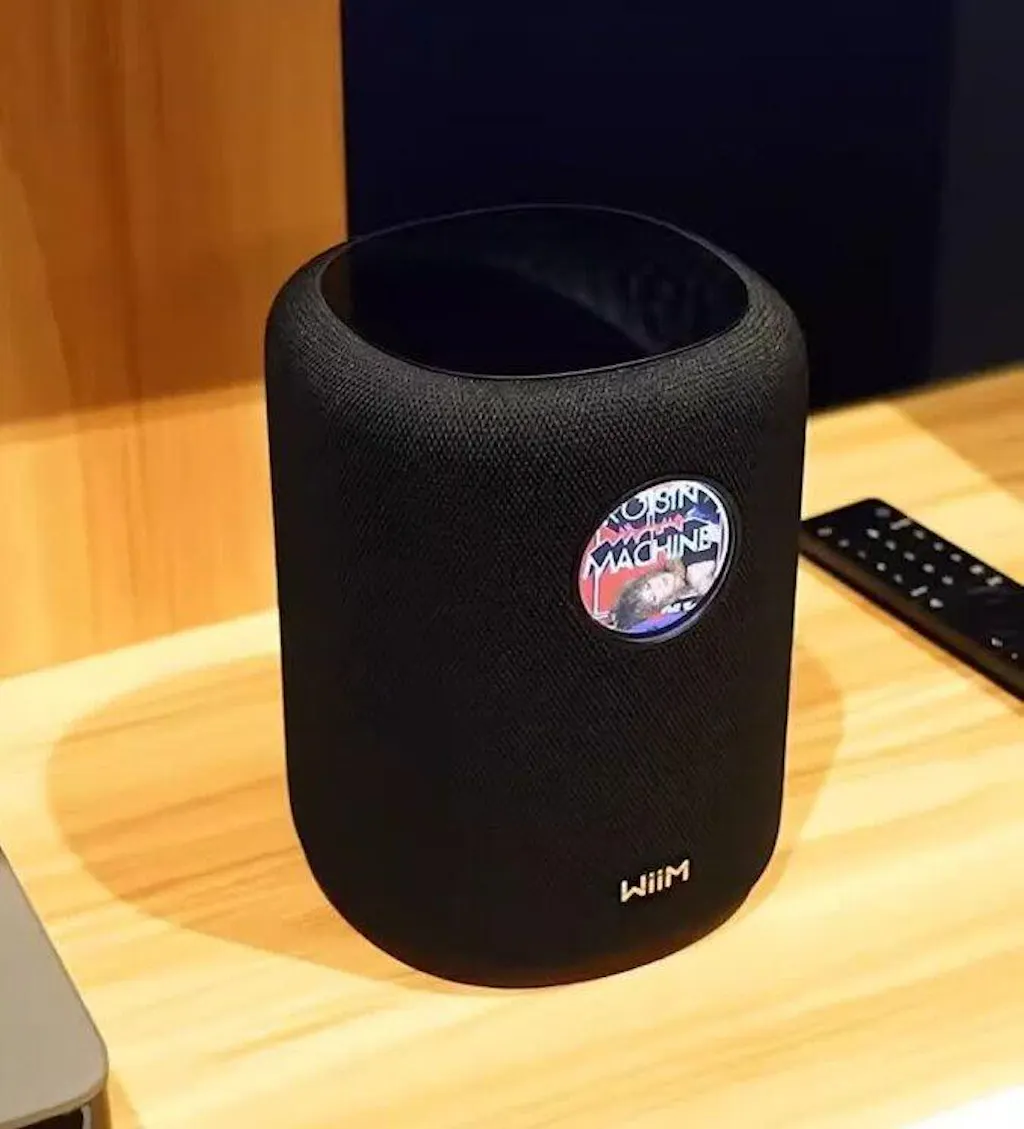
Description
| Feature | Detailed Specification |
| Audio Configuration | 1x Woofer + 2x Tweeters (3-Way) |
| Amplification | 3x Class-D Amps (100W Peak Power) |
| Display | 1.8-inch Circular Touchscreen |
| Network | Wi-Fi 6E (802.11ax), Ethernet (10/100Mbps) |
| Connectivity | Bluetooth 5.3 (TX/RX), 3.5mm Aux In, USB-A (Storage) |
| Streaming Protocols | Roon Ready, Google Cast, AirPlay 2 (check region), Tidal/Spotify Connect |
| Smart Features | AI RoomFit, Alexa Built-in (Microphone) |
| Dimensions | Approx. 146 x 146 x 193 mm |
| Power | AC Power (Not battery operated) |
WiiM Sound Hi-Res Wireless Smart Speaker
- See the music. Feel the difference. The WiiM Sound is not just another smart speaker; it is the first all-in-one wireless speaker designed specifically for the high-resolution streaming era. Breaking the mold of "blind" speakers, the WiiM Sound integrates a vibrant 1.8-inch circular touch display, giving you instant visual control over your music, album art, and settings without needing to reach for your phone.
Audiophile Sound in a Compact Form
- 3-Way Driver Architecture:Don't let the compact size fool you. The WiiM Sound is engineered with a 3-driver configuration (1 woofer + 2 tweeters) powered by three independent Class-D amplifiers. Capable of delivering 100W Peak Power, it produces room-filling stereo sound with crisp highs and surprisingly deep, punchy bass.
- True Hi-Res Streaming:While other smart speakers compress your audio, WiiM Sound supports up to 24-bit/192kHz high-resolution playback. Whether you stream via Tidal Connect, Spotify Connect, DLNA, or Roon Ready, you hear the music exactly as the artist intended.
The Smarter Speaker
- 1.8-Inch Touchscreen Interface:The signature feature of the WiiM Sound. The built-in glass touch display shows vivid Album Art, track information, and playback controls. It also allows you to switch presets, adjust volume, and toggle inputs with a simple swipe.
- AI RoomFit™ Correction:Great sound, anywhere. Using built-in microphones and advanced DSP, the AI RoomFit™ technology automatically analyzes your room's acoustics and adjusts the EQ in real-time to eliminate boominess and enhance clarity—no manual calibration required.
- Seamless Apple Integration: Fully compatible with Apple AirPlay 2. Group the WiiM Sound with your HomePods or other AirPlay 2 speakers to create a synchronized multi-room audio system effortlessly.
Unmatched Connectivity
- Tri-Band Wi-Fi 6E & Bluetooth 5.3:Experience lag-free streaming with the latest Wi-Fi 6E technology. The WiiM Sound also features two-way Bluetooth 5.3, allowing it to act as a Bluetooth speaker for your phone OR transmit audio to your Bluetooth headphones for private listening.
- Multi-Room & Stereo Pairing:Build your whole-home audio system. Group the WiiM Sound with your existing WiiM Mini, Pro, or Amp devices for synchronized playback. Buy two WiiM Sounds and pair them wirelessly to create a powerful 2.0 Stereo System with unmatched separation.
Why Choose WiiM Sound?
- Better Value: Outperforms the Sonos Era 100 and rivals the Era 300 at a significantly lower price point.
- Visual Feedback: The screen is a game-changer. Seeing the album art adds a tangible connection to your digital music.
- WiiM Ecosystem: Seamlessly integrates with all your other WiiM devices. Use it as a rear surround speaker (future firmware update) or a standalone zone.
- Versatile Inputs: Unlike many smart speakers, it includes a 3.5mm Line-In and USB port, allowing you to connect a turntable (with preamp) or play local files.
Add Deep Bass: Pair your WiiM Sound with the WiiM Sub Pro for a cinematic 2.1 audio experience with earth-shaking lows.
Control the Whole House: Use the WiiM Ultra as your central hub to broadcast vinyl records wirelessly to your WiiM Sound in another room.
Specifications
- Weight: 200gr
- Usage: Indoor & outdoor
Pros and cons
- Sustainably produced
- Ideal for everyday use

wiim Sound
Touch What You Hear.
Smart speaker • 24-bit/192 kHz • 100W peak • AI RoomFit™ • 1.8″ round touchscreen
-

100W Powerful
Output4” woofer + dual
tweeters for rich,
detailed sound. -

Tuned byAI RoomFit™
Auto-adjusts sound to your space for optimal performance.
-
Open by Design
Cast or connect the way you like: no lock-in.


1.8” Hi-Res Touch Display
Glance and control without picking up your phone.
-

Double Up. True Stereo. Bigger Stage.
Wider soundstage, clearer vocals, pinpoint imaging - set up
in a few taps. -

Make It Yours
Multiple clock faces, dynamic wallpaper,
album art, and playback options.


-

Pure Fidelity.Instant Control.
WiiM Soundfuseshigh-end acousticswithadvanced DSPto reveal the artist’s intent —no coloration, onlypure fidelity.WithHi‑Res 24‑bit/192 kHzplayback,AI RoomFit™that adapts to any room, and a1.8″ touch displayfor instant control, it deliversnatural balance, lifelike detail,andeffortless dynamicswherever you place it.
-


Hi-Res Power, Precisely Tuned
Enjoy lifelike detail at up to 24-bit/192 kHz with gapless playback. AI RoomFit™ tailors sound to your space for
rich, balanced audio—wherever you place it.24-bit /192 kHz Hi-Res playback
Gapless playback for uninterrupted albums
Al RoomFit™: automatic room correction

Premium 2‑Way Acoustic
Architecture
Custom, independently tuned drivers for high and mid/low bands with a precision crossover. Each range works in its sweet spot for low distortion, true‑to‑source timbre, rich detail, and fatigue‑free listening.

Material‑Matched Drivers
4″ Paper‑Cone Woofer + Dual 1″ Silk‑Dome Tweeters — Paper delivers tight, natural mid‑bass; silk provides smooth, extended highs and wide dispersion—yielding a coherent soundstage that is clear, refined, and never harsh.
Double Up. True Stereo. Bigger Stage
Pair two WiiM Sound speakers for dedicated L/R channels—wider soundstage, clearer vocals, pinpoint
imaging. Set up in a few taps in the WiiM Home App.
-

AI RoomFit™Auto
CalibrationOne tap in the WiiM Home App analyzes your room and placement using
the speaker + phone mics, then optimizes response for balanced, fatigue‑
free sound—no trial‑and‑error or extra gear. -


Personalized Sweet‑Spot
Adapts to where you actually sit and re‑tunes in seconds after you move or rearrange, preserving the speaker’s intended tonality while keeping music clear anywhere in the room.


-

Your Music, Your Way
Stream from over 20 services directly in the WiiM Home App
—including Spotify, Amazon Music, YouTube Music, Music,
TIDAL, Qobuz, Deezer, Napster, Pandora, Plex, SoundCloud,
TuneIn, iHeartRadio, and more.
Prefer your native apps? Cast seamlessly with Spotify
Connect,TIDAL/Qobuz Connect, Alexa Cast, Google Cast,
Roon, and DLNA. -

Music On Time, Every Time.
Smart Presets
Instantly launch your favorite playlists, radio, or inputs with
personalized settings for volume, EQ, shuffle/repeat, and
play duration—right from the touchscreen, app, or WiiM Remote.Music Alarms & Routines
Schedule wakeups and wind-downs with your favorite presets,
streaming services, or local music. Customize time,
volume, and duration to fit your daily routine. -

Every Room in Sync
Group speakers, sync music across rooms, or set a unique vibe in each
space. Control playback and volume per room in the WiiM Home
App, and play external inputs in every room. -

All the Ways to Play
Start, skip, adjust, or search—by touch, app, voice, or the
included WiiM Voice Remote 2 Lite. With one-press shortcuts
and voice commands, you’re always in control, whether
you’re at the speaker or on the couch. -

Control from the couch with the
WiiM Voice Remote 2 LiteOne‑press play/volume/skip
Preset buttons (1–4) for instant favorites
Source switch
Push‑to‑talk voice
USB‑C charging (cable included)


Cinematic Sound
AddWiiM Sub Proto deepen and tighten the bass, or pair WiiM Sound withWiiM UltraorAmp Ultrato assigncenterorsurroundroles in a compatible WiiM home‑theater setup.
Specs
Dimensions :
5.8” x 5.8” x 7.6” (146 x 146 x 194 mm).
Weight :
5.5 lbs (2.5 kg).
Frequency Response :
50 Hz - 20K Hz.
Peak Power :
100 W total.• 1 x 4” long-throw woofer, 50W• 2 x full-range tweeters, 2x25W
Crossover Frequency :
2.4 kHz.
Hi-Res :
Up to 24-bit/192 kHz, gapless playback.
Room Correction :
AI RoomFit™ automatic/assisted tuning.
EQ :
On-device Quick EQ; advanced EQ in app (presets + custom); separate EQ settings for Wi-Fi/ Ethernet, Bluetooth, and Aux.
Wireless Input:
• Wi-Fi 6 (802.11 b/g/n/ax, tri-band: 2.4/5/6 GHz) • Bluetooth 5.3 (Receiver & Transmitter, supports SBC, AAC, LC3)
Wired Input :
• 100 Mbps Ethernet • 3.5mm Aux input
Control:
• 1.8″ Round Touch Display (Hi‑Res) • Touch Buttons: Play/Pause, Volume Up/Down, Next/Previous Track • WiiM Voice Remote 2 Lite (included)— one‑tap playback/volume/skip, push‑to‑talk voice,
preset buttons
• Voice : Works with Alexa or Google Assistant via compatible devices • App : WiiM Home App for iOS / Android / Windows / MAC / Apple TV / Google TV
Supported Platforms:
WiiM Home App, Google Cast, Spotify Connect, TIDAL Connect, DLNA, LMS, Roon Ready
Multi-Room Audio:
WiiM, Google Cast, and Alexa multi-room systems
Stereo Pairing:
Enables left/right speaker setup for expanded soundstage
Home Theater Integration:
Functions as the surround or center channel speaker in a Dolby 5.1 setup
Smart Preset:
Streamlines the listening experience by offering quick access to frequently used content and settings.
Alarm Clock:
Set the alarm time, occurrence, and choose from various music sources.
Screen:
1.8” glass-covered, high-resolution touch display
Functions:
• Playback control, album art, EQ adjustments, audio input selection, device settings • Display queue, presets, VU meters, time/date in standby mode • Supports customizable wallpapers • Guides setup (OOBE) and OTA firmware updates
AC-powered:
100-240V AC universal power supply; energy‑efficient standby; firmware over‑the‑air (OTA) updates.
Finishes :
Minimalist modern, Black/White, Fabric/Glass/PC.
Dimensions :
5.8” x 5.8” x 7.6” (146 x 146 x 194 mm).
Weight :
5.5 lbs (2.5 kg).
Package Contents
• WiiM Sound Smart Speaker *1 • WiiM Voice Remote 2 Lite (with batteries) *1 • Power Cable *1 • 3.5mm to RCA cable *1 • Quick Start Guide *1
WiiM Sound — Frequently Asked Questions
What are the dimensions and weight?
5.7″ × 5.7″ × 7.5″ (146 × 146 × 193 mm), 5.5 lb (2.5 kg).
How do I pair Bluetooth?
Start pairing from theremote(hold Play 3s), from theon-screen Input menu, from the volume+/- buttons (hold for 2s) on the top, or from theWiiM Home Appby selecting Bluetooth as source.
Does it support Apple AirPlay 2?
Yes, it supports casting via AirPlay 2, allowing seamless integration with your Apple ecosystem.
Does it have a battery?
No. The WiiM Sound is a high-power home speaker designed to be plugged into a wall outlet. It is not a portable Bluetooth speaker.
What is WiiM Sound?
WiiM Sound is a compact, display-first smart speaker that deliversHi-Res audio up to 24-bit/192 kHz, 100W peakoutput,AI RoomFit™room correction, and a1.8″ round touch displayfor instant, no-phone control. It streams from 20+ services via the WiiM Home App or directly from native apps (Google Cast, Spotify/TIDAL/Qobuz Connect, Alexa Cast, DLNA, Roon/LMS).
What’s in the box?
WiiM Sound,WiiM Voice Remote 2 Lite(with USB-C charging cable), power cable, RCA cable, Quick Start Guide.
How do I set up WiiM Sound?
Plug in, open theWiiM Home App(iOS/Android), and follow the on-screen prompts to connect viaWi-Fi or Ethernet, update firmware, name the device, learn screen gestures, choose default/standby screens, and enable Google Cast/Alexa (optional).
Does it support Ethernet?
Yes. Connect an Ethernet cable and the speaker automatically switches to wired networking (Wi-Fi is disabled until Ethernet is unplugged).
What audio quality does it support?
Hi-Res playbackup to 24-bit/192 kHzwithgaplesssupport.
What’s the driver configuration and power?
4″ long-throw paper-cone woofer + dual 1″ silk-dome tweeters, precision 2-way crossover at2.4 kHz, 100 W peakoutput,50 Hz–20 kHzfrequency response.
What does AI RoomFit™ do?
RoomFit™ analyzes your room and speaker placement to auto-correct the response for richer, more balanced sound—run it from the WiiM Home App.
Can I fine-tune EQ?
Yes. On-deviceQuick EQ, plus in-app10-band Graphic EQand10-band Parametric EQwithper-sourceprofiles (Wi-Fi/Ethernet, Bluetooth, Aux-In).
What can I do on the 1.8″ touch display?
See album art/time/track info;play/pause/skip/like; picksource; openQuick EQ; viewRecently Played; startSmart Presets; seeRoomFit status; customizeclock faces/wallpapers; and guide OOBE/updates.
Which streaming methods and services are supported?
Stream inside theWiiM Home Appor cast directly viaGoogle Cast, Spotify Connect, TIDAL Connect, Qobuz Connect, Alexa Cast, DLNA, Roon/LMS(Roon Ready certification pending). You can also play fromYouTube MusicandAmazon Musicvia casting.
Does WiiM Sound support multi-room audio?
Yes.•WiiM Multi-Room: syncs music across WiiM devices and canre-broadcast Aux-Into all WiiM rooms.•Google Cast/Alexa groups: also supported for network-streamed sources (physical inputs can’t be sent to those third-party groups).
Can I pair two speakers for stereo?
Yes—Stereo Pairingcreates dedicatedL/R channelsfor a wider stage and clearer imaging; set it in the WiiM Home App.
Can WiiM Sound be used for home theater?
Yes—with compatible WiiM components you can assign WiiM Sound assurroundorcenterin a Dolby 5.1 setup, and useDialogue Enhancementto lift voices.
Can I pair it with WiiM Sub Pro? What’s the benefit?
Yes. WiiM Sound pairs withWiiM Sub Prowithin the WiiM ecosystem. Adding Sub Pro extends low-frequency reach and headroom fordeeper, tighter bass—and byoffloading bassto the sub, WiiM Sound can concentrate onmids and highsforclearer, more naturalplayback. Setup (level/phase) and grouping are handled in theWiiM Home App.What wireless and wired inputs are available?
What wireless and wired inputs are available?
Wi-Fi 6E, Bluetooth 5.3 (RX/TX; SBC, AAC, LC3), Ethernet,and3.5 mm Aux-In.
Does Aux-In have auto-sensing?
Yes—enableAuto-sensingin the app so playback switches when a signal is detected. Some turntables may require aphono preampbefore Aux-In.
Which voice assistants and controls are supported?
Control with thetouch display, WiiM Home App, the includedWiiM Voice Remote 2 Lite(one-press + push-to-talk via Alexa), andAlexa/Google Assistant via compatible devices.
What are Smart Presets, Alarms, and Routines?
One-tapSmart Presetslaunch favorite content with your chosen volume/EQ/shuffle/duration.Music Alarms & Routinesschedule wake-ups/wind-downs from services, your home share, orLine-In.
How do I reset the device or enter Wi-Fi setup?
Press/holdPlay/Pausefor3 secondsto start Wi-Fi setup; press/hold10 secondstofactory reset(voice and on-screen prompts confirm).
How are firmware updates handled?
Updates install automatically when connected to the network—silently between2:00–5:00 a.m.local time. You’ll see changes in the app after the upgrade.