
FiiO DP11 Review: CD Player, Transport or Ripper?
, by EMiUZEK Editorial Team, 7 min reading time
, by EMiUZEK Editorial Team, 7 min reading time
A practical FiiO DP11 guide covering its CD player, digital transport, USB DAC, preamp and WAV-ripping roles—and who actually needs each feature.
The FiiO DP11 is more than a basic CD transport: it can play discs through its own analogue output, feed an external DAC through coaxial, optical or AES/EBU, work as a USB DAC, and rip CDs to WAV on USB storage. That flexibility makes it appealing to listeners who still buy physical media but do not want a large traditional player. It is not automatically the right choice for everyone, however. If your amplifier already has a competent digital input, the transport functions may matter more than the internal DAC; if you have no CD collection, a streamer remains the simpler purchase.

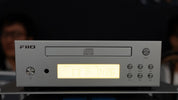
The DP11 is a compact desktop CD player built around a front-loading tray and a 3.7-inch amber display. Its footprint is approximately 230 × 213 mm, with a height of about 67 mm, so it fits more naturally into a desktop stack than many full-width hi-fi players. FiiO also uses separate power sections for the CD servo, digital processing and analogue stages, and the player accepts either internal AC power or an external 12 V/2 A DC supply.
Its most important characteristic is choice. You can treat it as a complete player, a digital-only transport, a variable-output source for active speakers, or a disc-ripping station. The correct role depends on the equipment you already own.
Use the stereo RCA analogue outputs when you want the DP11’s internal conversion to feed an integrated amplifier, preamplifier or active speakers. FiiO specifies a Cirrus Logic CS43198 DAC for this path. This is the simplest arrangement because the player performs the digital-to-analogue conversion itself.
Use coaxial, optical or AES/EBU when another component should handle conversion. A separate DAC is not automatically better; it is useful when it offers measurably stronger analogue performance, more convenient input switching, room correction, headphone amplification, or a sound you have already compared at matched level. Coaxial and AES/EBU are natural choices for equipment that accepts them, while optical provides electrical isolation and is often convenient for longer system integration.
If your amplifier already includes a capable DAC, buying another converter simply duplicates functions. In that case, the DP11’s disc mechanism and digital outputs are the real reason to buy it.
The rear USB input allows the DP11 to accept audio from a computer, phone or tablet. Officially announced support reaches up to 32-bit/384 kHz PCM and DSD256. Those figures describe the maximum input capability; they do not change the 16-bit/44.1 kHz data stored on a standard audio CD.
This function is valuable when desk space is limited. One component can handle the CD collection and occasional computer playback. It does not replace a network streamer: native Spotify Connect, AirPlay, Chromecast and multi-room playback are not the DP11’s purpose. Add a streamer through the appropriate system input if app-based playback is a priority.

With compatible USB storage connected, the DP11 can rip an audio CD to WAV files. This is useful for creating an uncompressed archive without operating a computer during the extraction. WAV preserves the PCM audio data, but it is less space-efficient than FLAC and its metadata handling varies between players.
Plan to verify the resulting tracks before treating them as an archive. Confirm track boundaries, listen to several sections, check whether album and track names need to be added manually, and keep a second backup on another drive. FiiO had not published a definitive ripping-speed figure at the time of writing, so do not buy the DP11 expecting a particular extraction time.
Collectors who need automatic metadata, AccurateRip verification or direct FLAC output may still prefer computer-based ripping software. DP11 ripping is about convenience, not a replacement for every archival workflow.
FiiO describes the DP11 as capable of preamplifier operation, which means its output level can be controlled for a compatible downstream system. Before connecting directly to active speakers or a power amplifier, confirm that variable output is selected and begin at minimum volume. A fixed line-level signal sent into a power amplifier without a volume controller can produce dangerously high playback levels.
An integrated amplifier with its own volume control is the safer default for users who are unsure. Connect the DP11’s RCA line output to a normal AUX, CD or line input—never to a phono input. If you use an external DAC, the volume-control arrangement depends on that DAC and the downstream amplifier.
The DP11 supports both its internal mains supply and an external 12 V/2 A DC source. That does not mean an aftermarket linear supply is necessary or will automatically improve audible performance. The standard supply is the baseline design and is normally the simplest choice.
If an external supply is considered, voltage, current capacity, connector dimensions and polarity must all match FiiO’s specification. Never connect both supply paths unless FiiO explicitly instructs it, and do not judge a power supply by wattage alone. A quiet, stable and correctly specified source matters more than marketing language.
The DP11 makes the most sense for someone with a meaningful CD collection who wants a compact component that can grow with the system. It can start as a complete analogue-output player, later become a transport for a better DAC, and also handle occasional USB audio or quick WAV ripping.
It is especially relevant when:
Skip the DP11 if nearly all listening comes from streaming services and you do not plan to build a disc library. A network streamer will provide a more direct interface for that use. It is also unnecessary if your current CD player reads discs reliably and already offers the digital output your DAC needs.
It is not a universal-disc player: do not assume support for SACD, DVD-Audio, Blu-ray Audio or video discs. Buyers who require those formats need a compatible universal transport. Likewise, a dedicated headphone output is not the central function here; connect the DP11 to a suitable headphone amplifier or DAC/amp.
A new transport is justified when the old mechanism is unreliable, the required digital connection is missing, desk space is limited, or the additional USB/ripping functions solve a real need. It is harder to justify when the current player already produces reliable bit-perfect digital output. In that case, changing transport may improve convenience and noise, but it should not be assumed to transform sound.
For a broader explanation of choosing between a transport and complete player, read our CD transport versus CD player guide. Buyers building a digital system can also compare priorities in our network streamer buying guide.

EMiUZEK currently lists the FiiO DP11 product page with active availability information. Because launch schedules and regional stock can change, check the product page for the latest price, dispatch timing and included accessories before ordering. The store listing may still show preorder wording while incoming units are being allocated.
Choose the DP11 for its flexible system roles, not because every output must be used. The best configuration is usually the simplest one that avoids duplicate conversion and gives you reliable control of volume.
FiiO DP11 is a practical bridge between physical CDs and a modern digital system. It can be a compact player, an external-DAC transport, a USB source and a convenient WAV ripper. Its strongest value is flexibility. Owners of a good existing player may not need it, but listeners rebuilding a CD system from scratch get several useful paths in one compact component.