
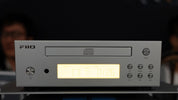
FiiO DP11 Firmware Update Guide: V60 and CD V12
, ~에 의해 EMiUZEK Editorial Team, 6 분 읽기 시간
Step-by-step instructions for FiiO DP11 MCU V60 and CD V12 firmware, including the separate update procedures, reported changes, and safe checks.
FiiO’s DP11 has two separate firmware packages: MCU firmware V60 and CD firmware V12. FiiO says V60 adds quick tray/play functions, two low-output level settings, and USB Audio Class playback optimizations; CD V12 improves an insufficient-ripping-capacity issue. These are separate updates with different installation steps. Download the DP11-specific files only from FiiO’s official firmware page, follow the instructions for the matching package, and do not interrupt an update.

The MCU update changes device behavior. FiiO lists one-touch tray closing and playback, quick tray opening and playback while the unit is off, two selectable LO output levels, improved tray-close display behavior when changing discs, and optimized UAC playback logic. These are manufacturer release-note claims; FiiO does not publish measured audio-performance changes for this firmware.
The CD firmware is a separate component. FiiO’s current firmware page lists CD V12 and says it improves an issue where ripping could run into insufficient storage capacity. The note does not specify a guaranteed maximum drive size, a compatibility list, or that every USB-drive problem is resolved. If a drive still fails after updating, check its format and available space, then contact FiiO support.
FiiO’s page also retains the earlier MCU V52 release notes, including remembered input/output selection and a changed default output. Do not mistake V52 for the latest listed MCU package when the official page shows V60. Firmware pages can change, so check the current version labels immediately before downloading.
Open FiiO’s official DP11 firmware page and confirm the latest MCU and CD versions. Download each package separately. Never rename, combine, or substitute files from another FiiO model. If the page or package instructions have changed since this guide was updated, follow the current official instructions.
For the MCU procedure, FiiO specifies a USB drive of 32 GB or less formatted as FAT32. FiiO recommends connecting the drive directly because adapters and USB hubs may cause compatibility problems. Back up any files on the drive first. Make sure you can safely disconnect and reconnect both AC and DC power, and do not begin during an unstable power situation.
Use the DP11’s side USB IN connection for the MCU update. The CD firmware procedure uses the side USB port while the player is in CD mode with the tray ejected. The firmware page gives the CD update separately; do not assume that the MCU power-on sequence applies to the CD firmware.
If the display does not show “UPD START,” stop and recheck the downloaded model-specific package, FAT32 formatting, BIN file location, USB connection, and power sequence. Do not repeatedly interrupt or force a partial update. Use FiiO support if the player remains unresponsive.

FiiO’s currently visible CD procedure is shorter than its MCU instructions and does not publish a drive-capacity limit in that section. Do not transfer the MCU drive limit or its power-button sequence to the CD update unless FiiO’s current package instructions explicitly say to. If the update does not start, stop and check the official instructions before trying again.
If you want the new tray controls, selectable LO output level, or UAC playback optimization, check and install the MCU package. If the problem is CD ripping that reports insufficient capacity, the relevant package is CD V12. A firmware update is not a substitute for a correctly formatted, working USB drive, and the published release note does not promise universal compatibility.
The DP11’s LO output settings should not be treated as a full preamp or headphone-volume control. Confirm the output mode and downstream volume control before connecting the player directly to powered speakers or a power amplifier. Start with the downstream volume low. For a broader look at the player’s roles and connections, see our FiiO DP11 review and our guide to CD transports versus complete CD players.
Owners who need one of the listed fixes or new functions have a clear reason to consider the update. If the DP11 is working well and you do not need those changes, there is no release-note claim that V60 improves sound quality. Read FiiO’s instructions first, save the current settings you rely on, and avoid updating just because a larger version number sounds better.
FiiO’s support page is the source of truth for the current download and version numbers. EMiUZEK currently lists the FiiO DP11 as a US$175 pre-order. The listing asks buyers to contact EMiUZEK for the current shipping estimate before ordering; dispatch timing depends on the inbound schedule.
Are MCU V60 and CD V12 the same update?
No. FiiO lists separate MCU and CD firmware packages and different installation procedures.
Does CD V12 guarantee every USB drive will work?
No. FiiO says it improves an insufficient-ripping-capacity issue but does not publish a universal drive compatibility guarantee.
Can I use a USB hub for the MCU update?
FiiO recommends direct connection because adapters or hubs may cause compatibility problems.
Where should I download the files?
Use only FiiO’s official DP11 firmware page, and confirm the displayed version before each update.